> ## Documentation Index
> Fetch the complete documentation index at: https://docs-dev-feat-acul-js-sdk-1-7-0-docs.mintlify.site/llms.txt
> Use this file to discover all available pages before exploring further.

# Variables et fonctions utilitaires

> Apprenez à utiliser les variables dans les Formulaires pour les Actions.

Les variables vous permettent d’accéder aux données contenues dans les Formulaires et les Flux pour créer une logique commerciale et des automatismes personnalisés.

Voici quelques considérations de base sur l’utilisation des variables :

* Les variables sont entourées d’accolades `{{ variable }}`.
* Si une variable n’existe pas ou ne peut pas être résolue, elle a le même effet qu’une variable dont la valeur est `undefined (indéfini)`.
* Vous pouvez utiliser des opérateurs nuls pour gérer les variables dont la valeur est `null` ou `undefined`, par exemple :`{{fields.foo ?? fields.bar}}`.

## Variables disponibles

Vous pouvez utiliser différents types de variables pour référencer et transformer les données que vous recueillez auprès des clients avec les Formulaires et les Flux.

| Variable                   | \_Syntax          | Where              | Description                                                                  |
| -------------------------- | ----------------- | ------------------ | ---------------------------------------------------------------------------- |
| Contexte                   | `{{contexte.*}}`  | Formes / Flux      | Données contextuelles de référence de la transaction en cours                |
| Champs de formulaire       | `{{fields. *}}`   | Formulaires / Flux | Données de référence des champs de votre formulaire et des champs cachés     |
| Variables partagées        | `{{vars.*}}`      | Formulaires / Flux | Données de référence stockées en tant que variables partagées                |
| Sortie des actions de flux | `{{actions. *}}`  | Flux               | Données de référence de la réponse de sortie des actions de flux précédentes |
| Fonctions d’aide           | `{{fonctions.*}}` | Formulaires / Flux | Fonctions d’aide pour transformer les données                                |

### Variables de contexte

Les Formulaires et les Flux héritent automatiquement des variables de contexte de la transaction en cours. Vous pouvez accéder aux variables de contexte suivantes :

* L’objet `user`, avec accès aux propriétés suivantes :

  * `user.user_id`
  * `user.username`
  * `user.name`
  * `user.given_name`
  * `user.family_name`
  * `user.nickname`
  * `user.email`
  * `user.email_verified`
  * `user.phone_number`
  * `user.phone_verified`
  * `user.picture`
  * `user.user_metadata`
  * `user.app_metadata`
  * `user.created_at`
  * `user.updated_at`
  * `user.last_password_reset`
  * `user.identities`
* L’objet `organization`, avec accès aux propriétés suivantes :

  * `organization.id`
  * `organization.name`
  * `organization.display_name`
  * `organization.metadata`
* L’objet `client`, avec accès aux propriétés suivantes :

  * `client.client_id`
  * `client.name`
* L’objet `tenant (locataire)`, avec accès à la propriété suivante :

  * `tenant.name`
* L’objet `transaction`, avec accès à la propriété suivante :

  * `transaction.state`

<Accordion title="Exemple d’objet contextuel">
  ```json lines theme={null}
  {
    "user": {
      "user_id": "auth0|658409...",
      "name": "ana@travel0.com",
      "nickname": "ana",
      "email": "ana@travel0.com",
      "email_verified": true,
      "picture": "https://s.gravatar.com/avatar/8eb1b522f6...",
      "user_metadata": {},
      "app_metadata": {},
      "created_at": "2023-12-21T09:46:40.487Z",
      "updated_at": "2024-05-07T10:44:26.271Z",
      "last_password_reset": "2023-12-21T09:49:08.932Z",
      "identities": [
        {
          "user_id": "6584...",
          "isSocial": false,
          "provider": "auth0",
          "connection": "Username-Password-Authentication"
        }
      ]
    },
    "client": {
      "client_id": "xpeg5...",
      "name": "My App"
    },
    "tenant": {
      "name": "tenant-testing"
    },
    "transaction": {
      "state": "hKFo2SBId2M0..."
    }
  }
  ```
</Accordion>

Par exemple :  `{{context.user.user_id}}` référence `user_id` de l’objet `user`.

<Frame>
  <img src="https://mintcdn.com/docs-dev-feat-acul-js-sdk-1-7-0-docs/5uR9r62WgPW9L4zy/docs/images/fr-ca/cdy7uua7fh8z/3B8DRhXO2wGqeqSFb8KbQv/0a61cdbbb7f1d290950a2ddb9857aac3/Contex-variable.png?fit=max&auto=format&n=5uR9r62WgPW9L4zy&q=85&s=1d3be6dd54b59c7541059c75a8bb65d4" alt="Dashboard > Forms > Flows" data-og-width="1141" width="1141" data-og-height="219" height="219" data-path="docs/images/fr-ca/cdy7uua7fh8z/3B8DRhXO2wGqeqSFb8KbQv/0a61cdbbb7f1d290950a2ddb9857aac3/Contex-variable.png" data-optimize="true" data-opv="3" srcset="https://mintcdn.com/docs-dev-feat-acul-js-sdk-1-7-0-docs/5uR9r62WgPW9L4zy/docs/images/fr-ca/cdy7uua7fh8z/3B8DRhXO2wGqeqSFb8KbQv/0a61cdbbb7f1d290950a2ddb9857aac3/Contex-variable.png?w=280&fit=max&auto=format&n=5uR9r62WgPW9L4zy&q=85&s=6aa2cf43a166c30b308cf0a12d48bafe 280w, https://mintcdn.com/docs-dev-feat-acul-js-sdk-1-7-0-docs/5uR9r62WgPW9L4zy/docs/images/fr-ca/cdy7uua7fh8z/3B8DRhXO2wGqeqSFb8KbQv/0a61cdbbb7f1d290950a2ddb9857aac3/Contex-variable.png?w=560&fit=max&auto=format&n=5uR9r62WgPW9L4zy&q=85&s=180e8ae0ad44437663db1e673806109e 560w, https://mintcdn.com/docs-dev-feat-acul-js-sdk-1-7-0-docs/5uR9r62WgPW9L4zy/docs/images/fr-ca/cdy7uua7fh8z/3B8DRhXO2wGqeqSFb8KbQv/0a61cdbbb7f1d290950a2ddb9857aac3/Contex-variable.png?w=840&fit=max&auto=format&n=5uR9r62WgPW9L4zy&q=85&s=21784d5d6df8cfc9fdfb1c361420aa2b 840w, https://mintcdn.com/docs-dev-feat-acul-js-sdk-1-7-0-docs/5uR9r62WgPW9L4zy/docs/images/fr-ca/cdy7uua7fh8z/3B8DRhXO2wGqeqSFb8KbQv/0a61cdbbb7f1d290950a2ddb9857aac3/Contex-variable.png?w=1100&fit=max&auto=format&n=5uR9r62WgPW9L4zy&q=85&s=468e88766685f68bec51aff06c241cd8 1100w, https://mintcdn.com/docs-dev-feat-acul-js-sdk-1-7-0-docs/5uR9r62WgPW9L4zy/docs/images/fr-ca/cdy7uua7fh8z/3B8DRhXO2wGqeqSFb8KbQv/0a61cdbbb7f1d290950a2ddb9857aac3/Contex-variable.png?w=1650&fit=max&auto=format&n=5uR9r62WgPW9L4zy&q=85&s=d558a7120b8a1de3c035b194741ebdc5 1650w, https://mintcdn.com/docs-dev-feat-acul-js-sdk-1-7-0-docs/5uR9r62WgPW9L4zy/docs/images/fr-ca/cdy7uua7fh8z/3B8DRhXO2wGqeqSFb8KbQv/0a61cdbbb7f1d290950a2ddb9857aac3/Contex-variable.png?w=2500&fit=max&auto=format&n=5uR9r62WgPW9L4zy&q=85&s=a5eb2279e9d9255c4d817d9663944ddf 2500w" />
</Frame>

### Variables des champs du formulaire

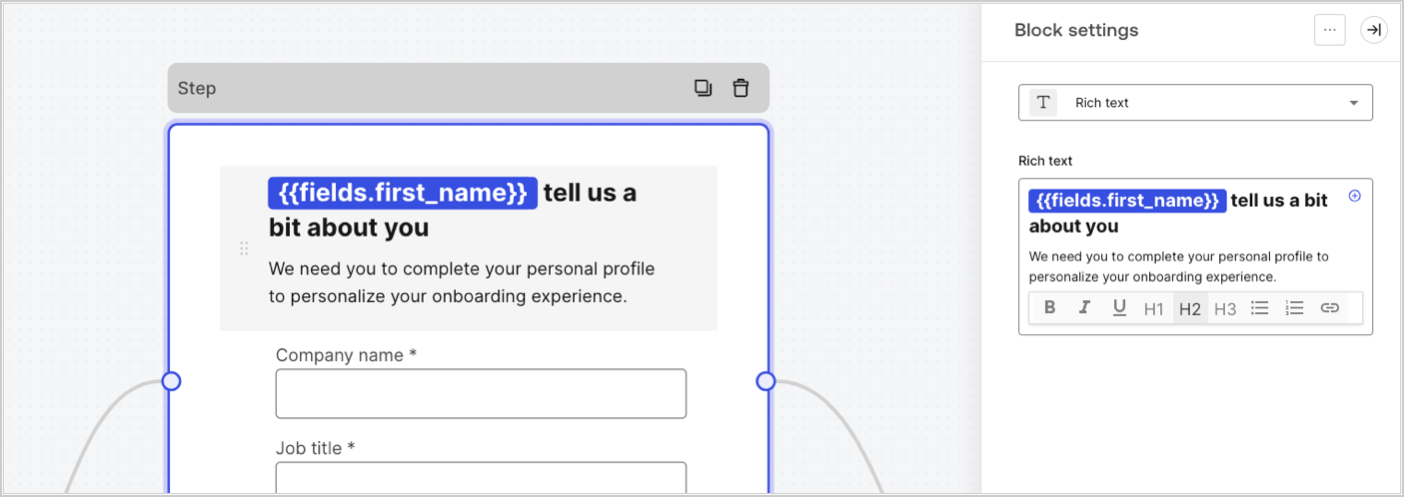
Les variables de champ contiennent les données recueillies auprès de l’utilisateur dans les champs de saisie du formulaire et les données des champs cachés. Les données de chaque champ varient en fonction du type de champ. Par exemple : `{{fields.first_name}}` référence la valeur saisie dans le champ ayant l’ID `first_name`.
<Frame>
  <img src="https://mintcdn.com/docs-dev-feat-acul-js-sdk-1-7-0-docs/yrAEVw_5ATlGNUB6/docs/images/fr-ca/cdy7uua7fh8z/4D42A6ww4XvFxweoxh04Rd/016c2ed9d25bc2267ed3ed31bf8b2bf6/form-fields-variable.png?fit=max&auto=format&n=yrAEVw_5ATlGNUB6&q=85&s=f48b588d39df18133a51f6e7f3b85a41" alt="Dashboard > Actions > Forms > Form" data-og-width="1404" width="1404" data-og-height="497" height="497" data-path="docs/images/fr-ca/cdy7uua7fh8z/4D42A6ww4XvFxweoxh04Rd/016c2ed9d25bc2267ed3ed31bf8b2bf6/form-fields-variable.png" data-optimize="true" data-opv="3" srcset="https://mintcdn.com/docs-dev-feat-acul-js-sdk-1-7-0-docs/yrAEVw_5ATlGNUB6/docs/images/fr-ca/cdy7uua7fh8z/4D42A6ww4XvFxweoxh04Rd/016c2ed9d25bc2267ed3ed31bf8b2bf6/form-fields-variable.png?w=280&fit=max&auto=format&n=yrAEVw_5ATlGNUB6&q=85&s=db6096398c358bc0a300b247f6caec53 280w, https://mintcdn.com/docs-dev-feat-acul-js-sdk-1-7-0-docs/yrAEVw_5ATlGNUB6/docs/images/fr-ca/cdy7uua7fh8z/4D42A6ww4XvFxweoxh04Rd/016c2ed9d25bc2267ed3ed31bf8b2bf6/form-fields-variable.png?w=560&fit=max&auto=format&n=yrAEVw_5ATlGNUB6&q=85&s=f62e4ed56423777adc4558287c0564ac 560w, https://mintcdn.com/docs-dev-feat-acul-js-sdk-1-7-0-docs/yrAEVw_5ATlGNUB6/docs/images/fr-ca/cdy7uua7fh8z/4D42A6ww4XvFxweoxh04Rd/016c2ed9d25bc2267ed3ed31bf8b2bf6/form-fields-variable.png?w=840&fit=max&auto=format&n=yrAEVw_5ATlGNUB6&q=85&s=14a1d02c384cbd4ffa4544f89439fb6b 840w, https://mintcdn.com/docs-dev-feat-acul-js-sdk-1-7-0-docs/yrAEVw_5ATlGNUB6/docs/images/fr-ca/cdy7uua7fh8z/4D42A6ww4XvFxweoxh04Rd/016c2ed9d25bc2267ed3ed31bf8b2bf6/form-fields-variable.png?w=1100&fit=max&auto=format&n=yrAEVw_5ATlGNUB6&q=85&s=b3ea3db3c3dd68479009399cc3e1c4cd 1100w, https://mintcdn.com/docs-dev-feat-acul-js-sdk-1-7-0-docs/yrAEVw_5ATlGNUB6/docs/images/fr-ca/cdy7uua7fh8z/4D42A6ww4XvFxweoxh04Rd/016c2ed9d25bc2267ed3ed31bf8b2bf6/form-fields-variable.png?w=1650&fit=max&auto=format&n=yrAEVw_5ATlGNUB6&q=85&s=3f8857663975575843e261c3de9d6bd1 1650w, https://mintcdn.com/docs-dev-feat-acul-js-sdk-1-7-0-docs/yrAEVw_5ATlGNUB6/docs/images/fr-ca/cdy7uua7fh8z/4D42A6ww4XvFxweoxh04Rd/016c2ed9d25bc2267ed3ed31bf8b2bf6/form-fields-variable.png?w=2500&fit=max&auto=format&n=yrAEVw_5ATlGNUB6&q=85&s=6ea385ec01d98cac54cb22926514a328 2500w" />
</Frame>

### Variables des actions de sortie de flux

Lorsqu’une action de flux est exécutée, elle génère un objet qui peut être référencé dans les actions suivantes. Par exemple : `{{actions.generate_otp.code}}` référence le code résultant de l’action avec l’ID`generate_otp`.

<Frame>
  <img src="https://mintcdn.com/docs-dev-feat-acul-js-sdk-1-7-0-docs/uZKa9xJyHQd-Q9UK/docs/images/fr-ca/cdy7uua7fh8z/6jYtEdYqSGXm3DDv0mxQ0o/2d48012629745e07137bf6ba42f4d829/flow-output-variable.png?fit=max&auto=format&n=uZKa9xJyHQd-Q9UK&q=85&s=a010e7299ce35557ca8d809020a231cd" alt="Dashboard > Actions > Forms > Flows" data-og-width="1404" width="1404" data-og-height="253" height="253" data-path="docs/images/fr-ca/cdy7uua7fh8z/6jYtEdYqSGXm3DDv0mxQ0o/2d48012629745e07137bf6ba42f4d829/flow-output-variable.png" data-optimize="true" data-opv="3" srcset="https://mintcdn.com/docs-dev-feat-acul-js-sdk-1-7-0-docs/uZKa9xJyHQd-Q9UK/docs/images/fr-ca/cdy7uua7fh8z/6jYtEdYqSGXm3DDv0mxQ0o/2d48012629745e07137bf6ba42f4d829/flow-output-variable.png?w=280&fit=max&auto=format&n=uZKa9xJyHQd-Q9UK&q=85&s=d48b282606f639470c8cf2ae7d531670 280w, https://mintcdn.com/docs-dev-feat-acul-js-sdk-1-7-0-docs/uZKa9xJyHQd-Q9UK/docs/images/fr-ca/cdy7uua7fh8z/6jYtEdYqSGXm3DDv0mxQ0o/2d48012629745e07137bf6ba42f4d829/flow-output-variable.png?w=560&fit=max&auto=format&n=uZKa9xJyHQd-Q9UK&q=85&s=f1ff46701f4623fb845d12264cd66105 560w, https://mintcdn.com/docs-dev-feat-acul-js-sdk-1-7-0-docs/uZKa9xJyHQd-Q9UK/docs/images/fr-ca/cdy7uua7fh8z/6jYtEdYqSGXm3DDv0mxQ0o/2d48012629745e07137bf6ba42f4d829/flow-output-variable.png?w=840&fit=max&auto=format&n=uZKa9xJyHQd-Q9UK&q=85&s=524d30018c016d2b5bd64dcf54846161 840w, https://mintcdn.com/docs-dev-feat-acul-js-sdk-1-7-0-docs/uZKa9xJyHQd-Q9UK/docs/images/fr-ca/cdy7uua7fh8z/6jYtEdYqSGXm3DDv0mxQ0o/2d48012629745e07137bf6ba42f4d829/flow-output-variable.png?w=1100&fit=max&auto=format&n=uZKa9xJyHQd-Q9UK&q=85&s=bef6ac2fe49ca13bb01c53e48410686b 1100w, https://mintcdn.com/docs-dev-feat-acul-js-sdk-1-7-0-docs/uZKa9xJyHQd-Q9UK/docs/images/fr-ca/cdy7uua7fh8z/6jYtEdYqSGXm3DDv0mxQ0o/2d48012629745e07137bf6ba42f4d829/flow-output-variable.png?w=1650&fit=max&auto=format&n=uZKa9xJyHQd-Q9UK&q=85&s=f3f68f48d5595ff789b44ab98d767880 1650w, https://mintcdn.com/docs-dev-feat-acul-js-sdk-1-7-0-docs/uZKa9xJyHQd-Q9UK/docs/images/fr-ca/cdy7uua7fh8z/6jYtEdYqSGXm3DDv0mxQ0o/2d48012629745e07137bf6ba42f4d829/flow-output-variable.png?w=2500&fit=max&auto=format&n=uZKa9xJyHQd-Q9UK&q=85&s=9964f53b620df06bf2dc1faaa9ccb0f8 2500w" />
</Frame>

### Variables partagées

Vous pouvez stocker des variables à partager avec des flux ultérieurs ou même avec des composants de formulaire dans la même transaction. Les variables partagées sont éphémères et sont associées à un parcours de formulaire spécifique. Leurs valeurs ne sont pas accessibles en dehors de ce parcours. Par exemple : `{{vars.external_id}}` référence la valeur d’une variable partagée avec l’ID `external_id`.

<Frame>
  <img src="https://mintcdn.com/docs-dev-feat-acul-js-sdk-1-7-0-docs/yrAEVw_5ATlGNUB6/docs/images/fr-ca/cdy7uua7fh8z/4571ExRTHL0KZKJKX9pNwj/abb631b8608a6356b0e5b3784cf8b02f/flow-shared-variable.png?fit=max&auto=format&n=yrAEVw_5ATlGNUB6&q=85&s=3fb54a77f13b0488786e6fbedd743e86" alt="Dashboard > Actions > Forms > Flows" data-og-width="1215" width="1215" data-og-height="162" height="162" data-path="docs/images/fr-ca/cdy7uua7fh8z/4571ExRTHL0KZKJKX9pNwj/abb631b8608a6356b0e5b3784cf8b02f/flow-shared-variable.png" data-optimize="true" data-opv="3" srcset="https://mintcdn.com/docs-dev-feat-acul-js-sdk-1-7-0-docs/yrAEVw_5ATlGNUB6/docs/images/fr-ca/cdy7uua7fh8z/4571ExRTHL0KZKJKX9pNwj/abb631b8608a6356b0e5b3784cf8b02f/flow-shared-variable.png?w=280&fit=max&auto=format&n=yrAEVw_5ATlGNUB6&q=85&s=49370a6036658bc3a6bdb86d318de899 280w, https://mintcdn.com/docs-dev-feat-acul-js-sdk-1-7-0-docs/yrAEVw_5ATlGNUB6/docs/images/fr-ca/cdy7uua7fh8z/4571ExRTHL0KZKJKX9pNwj/abb631b8608a6356b0e5b3784cf8b02f/flow-shared-variable.png?w=560&fit=max&auto=format&n=yrAEVw_5ATlGNUB6&q=85&s=cb19ed3eb25c40aef40fdbc6cfe53065 560w, https://mintcdn.com/docs-dev-feat-acul-js-sdk-1-7-0-docs/yrAEVw_5ATlGNUB6/docs/images/fr-ca/cdy7uua7fh8z/4571ExRTHL0KZKJKX9pNwj/abb631b8608a6356b0e5b3784cf8b02f/flow-shared-variable.png?w=840&fit=max&auto=format&n=yrAEVw_5ATlGNUB6&q=85&s=87bdeceeff9560126df61ecea630a519 840w, https://mintcdn.com/docs-dev-feat-acul-js-sdk-1-7-0-docs/yrAEVw_5ATlGNUB6/docs/images/fr-ca/cdy7uua7fh8z/4571ExRTHL0KZKJKX9pNwj/abb631b8608a6356b0e5b3784cf8b02f/flow-shared-variable.png?w=1100&fit=max&auto=format&n=yrAEVw_5ATlGNUB6&q=85&s=a6ca078aa182660eea21f6a0b95ad676 1100w, https://mintcdn.com/docs-dev-feat-acul-js-sdk-1-7-0-docs/yrAEVw_5ATlGNUB6/docs/images/fr-ca/cdy7uua7fh8z/4571ExRTHL0KZKJKX9pNwj/abb631b8608a6356b0e5b3784cf8b02f/flow-shared-variable.png?w=1650&fit=max&auto=format&n=yrAEVw_5ATlGNUB6&q=85&s=25e36ae6e0ca3911a30b1b1914cb43a6 1650w, https://mintcdn.com/docs-dev-feat-acul-js-sdk-1-7-0-docs/yrAEVw_5ATlGNUB6/docs/images/fr-ca/cdy7uua7fh8z/4571ExRTHL0KZKJKX9pNwj/abb631b8608a6356b0e5b3784cf8b02f/flow-shared-variable.png?w=2500&fit=max&auto=format&n=yrAEVw_5ATlGNUB6&q=85&s=0c0c3c4468cb960823a696e4d7087970 2500w" />
</Frame>

<Warning>
  Variables partagées :

  * elles sont internes (côté serveur) et ne sont pas exposées au navigateur (côté client).
  * elle peuvent être résolues et exposées au navigateur si vous avez référencé une variable partagée dans le composant de formulaire.
</Warning>

### Fonctions utilitaires

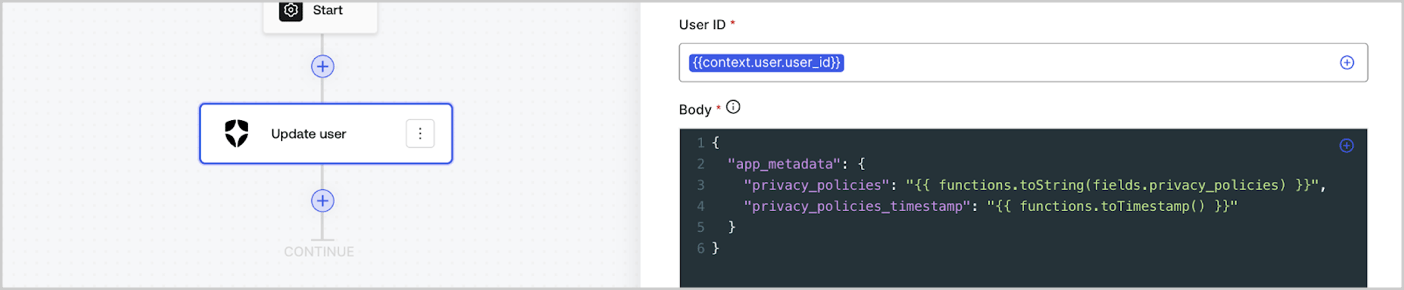
Les fonctions utilitaires permettent de transformer les données et d’effectuer des opérations simples. Par exemple : `{{functions.toString(fields.privacy_policies)}}` transforme la valeur du champ ayant l’ID `privacy_policies` utilisant la fonction `toString()`.
<Frame>
  <img src="https://mintcdn.com/docs-dev-feat-acul-js-sdk-1-7-0-docs/Vht83TOEsZSmOQB7/docs/images/fr-ca/cdy7uua7fh8z/1gyox33XJEtdkT43NppblT/0e878cc5ae2bde11b4207e105bbac6c5/flow-helper-functions.png?fit=max&auto=format&n=Vht83TOEsZSmOQB7&q=85&s=a960e1d9fc51ce97754d1e371f2b8d7f" alt="Dashboard > Actions > Forms > Flows" data-og-width="1404" width="1404" data-og-height="290" height="290" data-path="docs/images/fr-ca/cdy7uua7fh8z/1gyox33XJEtdkT43NppblT/0e878cc5ae2bde11b4207e105bbac6c5/flow-helper-functions.png" data-optimize="true" data-opv="3" srcset="https://mintcdn.com/docs-dev-feat-acul-js-sdk-1-7-0-docs/Vht83TOEsZSmOQB7/docs/images/fr-ca/cdy7uua7fh8z/1gyox33XJEtdkT43NppblT/0e878cc5ae2bde11b4207e105bbac6c5/flow-helper-functions.png?w=280&fit=max&auto=format&n=Vht83TOEsZSmOQB7&q=85&s=06a57bf5e3ccf0bef1c93935d953e7f4 280w, https://mintcdn.com/docs-dev-feat-acul-js-sdk-1-7-0-docs/Vht83TOEsZSmOQB7/docs/images/fr-ca/cdy7uua7fh8z/1gyox33XJEtdkT43NppblT/0e878cc5ae2bde11b4207e105bbac6c5/flow-helper-functions.png?w=560&fit=max&auto=format&n=Vht83TOEsZSmOQB7&q=85&s=305eaf69c2a9960df2f25bd86a234e55 560w, https://mintcdn.com/docs-dev-feat-acul-js-sdk-1-7-0-docs/Vht83TOEsZSmOQB7/docs/images/fr-ca/cdy7uua7fh8z/1gyox33XJEtdkT43NppblT/0e878cc5ae2bde11b4207e105bbac6c5/flow-helper-functions.png?w=840&fit=max&auto=format&n=Vht83TOEsZSmOQB7&q=85&s=5d2c5a307a1657193dd802ab46f17d5e 840w, https://mintcdn.com/docs-dev-feat-acul-js-sdk-1-7-0-docs/Vht83TOEsZSmOQB7/docs/images/fr-ca/cdy7uua7fh8z/1gyox33XJEtdkT43NppblT/0e878cc5ae2bde11b4207e105bbac6c5/flow-helper-functions.png?w=1100&fit=max&auto=format&n=Vht83TOEsZSmOQB7&q=85&s=12b9ee5aee132dd41f8fb827db743c72 1100w, https://mintcdn.com/docs-dev-feat-acul-js-sdk-1-7-0-docs/Vht83TOEsZSmOQB7/docs/images/fr-ca/cdy7uua7fh8z/1gyox33XJEtdkT43NppblT/0e878cc5ae2bde11b4207e105bbac6c5/flow-helper-functions.png?w=1650&fit=max&auto=format&n=Vht83TOEsZSmOQB7&q=85&s=5d5e901ce6266305412aa7383c219136 1650w, https://mintcdn.com/docs-dev-feat-acul-js-sdk-1-7-0-docs/Vht83TOEsZSmOQB7/docs/images/fr-ca/cdy7uua7fh8z/1gyox33XJEtdkT43NppblT/0e878cc5ae2bde11b4207e105bbac6c5/flow-helper-functions.png?w=2500&fit=max&auto=format&n=Vht83TOEsZSmOQB7&q=85&s=2eaf1776428e3a8e5ddde21aeaba220e 2500w" />
</Frame>

Les fonctions utilitaires disponibles sont les suivantes :

| Fonction                               | Description                                                                                                                                                                                                                                                                                   | Exemple                                                                                                          |
| -------------------------------------- | --------------------------------------------------------------------------------------------------------------------------------------------------------------------------------------------------------------------------------------------------------------------------------------------- | ---------------------------------------------------------------------------------------------------------------- |
| toArray(value)                         | Convertit la valeur en un tableau                                                                                                                                                                                                                                                             | {"{{ functions.toArray('abc') }}"} // \['abc']                                                                   |
| toBoolean(value)                       | Convertit la valeur en valeur booléenne                                                                                                                                                                                                                                                       | {"{{ functions.toBoolean(1) }}"} // true<br /><br />{"{{ functions.toBoolean(0) }}"} // false                    |
| length(value)                          | Renvoie la longueur de la valeur du paramètre                                                                                                                                                                                                                                                 | {"{{ functions.length('auth0') }}"} // 5                                                                         |
| mask(value)                            | Masque une valeur pour éviter l’exposition dans les exécutions                                                                                                                                                                                                                                | {"{{ functions.mask('my_awesome_secret') }}"} // ███                                                             |
| toNumber(value)                        | Convertit la valeur en nombre                                                                                                                                                                                                                                                                 | {"{{ functions.toNumber('123') }}"} // 123                                                                       |
| random(min, max, \[boolean])           | Renvoie un nombre aléatoire compris entre les valeurs minimales et maximales incluses.                                                                                                                                                                                                        | {"{{ functions.random(0, 6) }}"} // 4<br /><br />{"{{ functions.random(0, 6, true) }}"} // 3.8523497...          |
| slice(value, start, end)               | Renvoie une section d’un tableau de valeurs ou d’une chaîne de caractères entre les indices de début et de fin.                                                                                                                                                                               | {"{{ functions.slice( 'example', 3, 5) }}"} // 'mp'                                                              |
| toString(value)                        | Convertit la valeur en chaîne                                                                                                                                                                                                                                                                 | {"{{ functions.toString(123) }}"} // '123'                                                                       |
| substring(value, start, end)           | Renvoie une section d’une valeur entre les indices de début et de fin. En savoir plus sur les [différences entre les fonctions slice et substring](https://developer.mozilla.org/en-US/docs/Web/JavaScript/Reference/Global_Objects/String/substring#differences_between_substring_and_slice) | {"{{ functions.substring( 'example', 3, 5) }}"} // 'mp'                                                          |
| toTimestamp()                          | Renvoie l’horodatage UNIX actuel                                                                                                                                                                                                                                                              | {"{{ functions.toTimestamp() }}"} // 1628761483                                                                  |
| toTimestamp(date)                      | Renvoie la date fournie en heure UNIX                                                                                                                                                                                                                                                         | {"{{ functions.toTimestamp('2021-04-30T10:02:50.876Z') }}"} // 1619776970                                        |
| toTimestamp(date)                      | Renvoie la date fournie en heure UNIX                                                                                                                                                                                                                                                         | {"{{ functions.toTimestamp('2021-04-30T10:02:50.876Z') }}"} // 1619776970                                        |
| replaceAll(value, string, replacement) | Renvoie une nouvelle chaîne dans laquelle toutes les correspondances d’un modèle sont remplacées par un substitut.                                                                                                                                                                            | {"{{ functions.replaceall('2021-04-30', '-', '/') }}"} // 2021/04/30                                             |
| replace(value, string, replacement)    | Renvoie une nouvelle chaîne dans laquelle toutes les correspondances d’un modèle sont remplacées par un substitut. Si le motif est une chaîne, seule la première occurrence sera remplacée.                                                                                                   | {"{{ functions.replace('2021-04-30', '-', '/') }}"} // 2021/04-30                                                |
| split(value, separator, limit?)        | Renvoie une liste ordonnée de sous-chaînes divisées par le séparateur.                                                                                                                                                                                                                        | {"{{ functions.split('2021-04-30', '-') }}"} // \['2021', '04', '30']                                            |
| now()                                  | Renvoie la date actuelle au format ISO 8601.                                                                                                                                                                                                                                                  | {"{{ functions.now() }}"} // 2021-04-30T10:31:28.576Z                                                            |
| includes(collection, item, fromIndex?) | Renvoie le fait qu’un tableau contienne une certaine valeur parmi ses entrées.                                                                                                                                                                                                                | {"{{ functions.includes(['auth0', 'identity', 'authentication'], 'identity') }}"} // true                        |
| indexOf(collection, item, fromIndex?)  | Renvoie le premier indice auquel un élément donné peut être trouvé dans le tableau, ou -1 s’il n’est pas présent.                                                                                                                                                                             | {"{{ functions.indexOf(['auth0', 'identity', 'authentication'], 'identity') }}"} // 1                            |
| merge(base, value)                     | Renvoie un tableau fusionné, un objet ou concatène une chaîne de caractères en fonction du type de données de base.                                                                                                                                                                           | {"{{ functions.merge(['auth0', 'identity'], ['authentication']) }}"} // \['auth0', 'identity', 'authentication'] |
| md5(value)                             | Renvoie une valeur hachée MD5.                                                                                                                                                                                                                                                                | {"{{ functions.md5('auth0') }}"} // 7bbb597...                                                                   |
| sha1(value)                            | Renvoie une valeur hachée SHA1.                                                                                                                                                                                                                                                               | {"{{ functions.sha1('auth0') }}"} // b4ec5339...                                                                 |
| sha256(value)                          | Renvoie une valeur hachée SHA256.                                                                                                                                                                                                                                                             | {"{{ functions.sha256('auth0') }}"} // d9082bdc...                                                               |
| sha512(value)                          | Renvoie une valeur hachée SHA512.                                                                                                                                                                                                                                                             | {"{{ functions.sha512('auth0') }}"} // c0d588069d...                                                             |
| uuid()                                 | Renvoie un UUID v4 aléatoire                                                                                                                                                                                                                                                                  | {"{{ functions.uuid() }}"} // 36b8f84d-df4e-4d49-b662-bcde71a8764                                                |

## Meilleures pratiques pour les variables

### Utiliser des ID significatifs

Lorsque vous ajoutez un champ de Formulaire ou une action de Flux, l’ID est automatiquement généré.

Mettez à jour l’ID avec une valeur plus descriptive afin de pouvoir identifier les informations qu’il contient. Par exemple, si vous créez un champ de Formulaire qui stocke le prénom de l’utilisateur, modifiez l’ID en `first_name`.

### Soyez vigilant lorsque vous mettez à jour des ID existants

Si une variable est déjà utilisée et que vous devez modifier son ID, identifiez l’endroit où vous l’avez référencée et mettez l’ID à jour en conséquence pour éviter les valeurs indéfinies ou vides.

### Vérifier l’exécution des Flux

Si vous constatez une valeur de variable inattendue, utilisez l’aperçu [**Executions (Exécutions)**](/docs/fr-ca/customize/forms/flows/flow-execution-and-debugger) pour dépanner la variable.

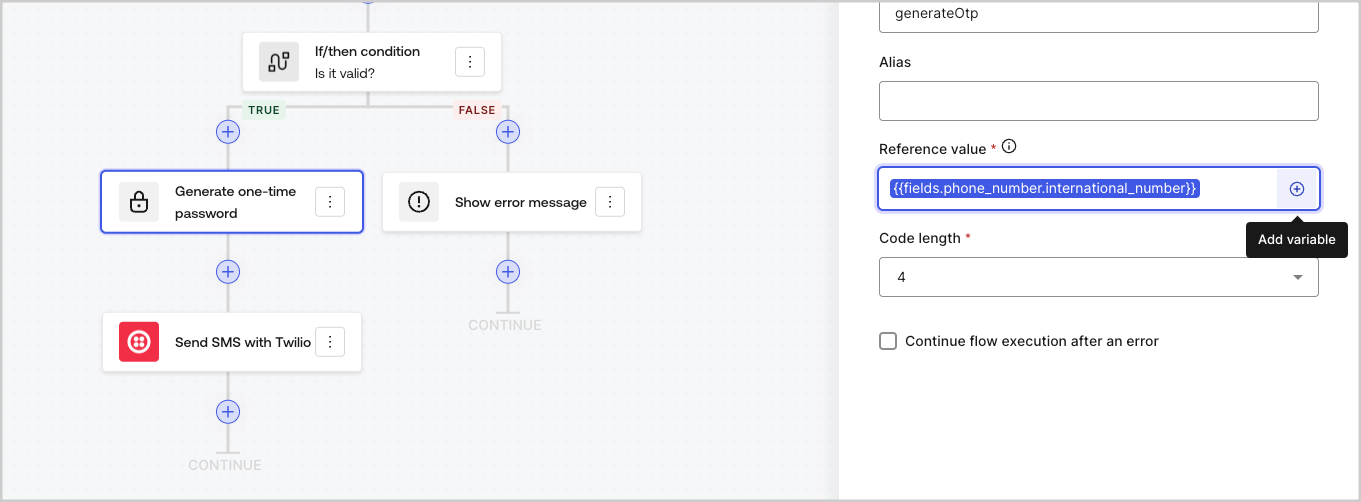
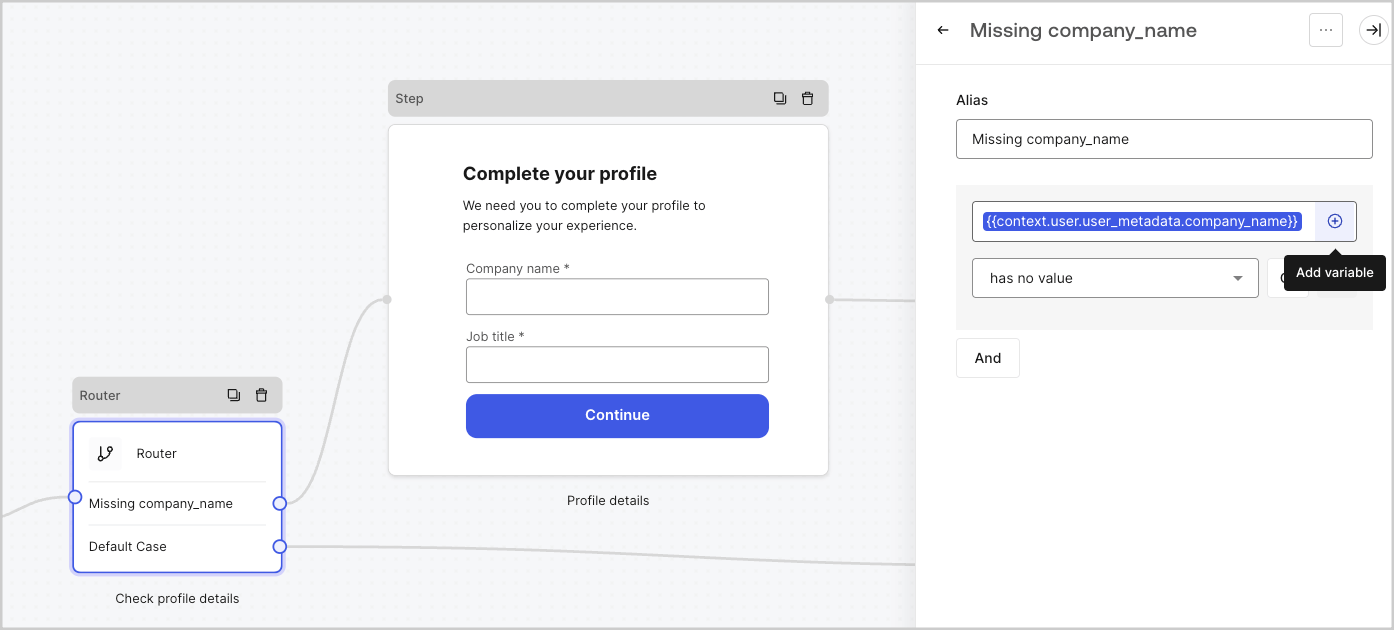
### Utiliser le menu de remplissage automatique

Le menu de remplissage automatique vous aide à localiser et à référencer correctement les variables existantes.
<Frame>
  <img src="https://mintcdn.com/docs-dev-feat-acul-js-sdk-1-7-0-docs/yrAEVw_5ATlGNUB6/docs/images/fr-ca/cdy7uua7fh8z/3SKnDuaMzSImxZtDDAoZaz/9ea800fad29ef71d1ded3c72b87660a4/Autocomplete-flows.png?fit=max&auto=format&n=yrAEVw_5ATlGNUB6&q=85&s=3199eb29bc807781e826bf4820366cf7" alt="Dashboard > Actions > Forms > Flows" data-og-width="1361" width="1361" data-og-height="502" height="502" data-path="docs/images/fr-ca/cdy7uua7fh8z/3SKnDuaMzSImxZtDDAoZaz/9ea800fad29ef71d1ded3c72b87660a4/Autocomplete-flows.png" data-optimize="true" data-opv="3" srcset="https://mintcdn.com/docs-dev-feat-acul-js-sdk-1-7-0-docs/yrAEVw_5ATlGNUB6/docs/images/fr-ca/cdy7uua7fh8z/3SKnDuaMzSImxZtDDAoZaz/9ea800fad29ef71d1ded3c72b87660a4/Autocomplete-flows.png?w=280&fit=max&auto=format&n=yrAEVw_5ATlGNUB6&q=85&s=3b8578edc8e994db4d9ed2b874be7909 280w, https://mintcdn.com/docs-dev-feat-acul-js-sdk-1-7-0-docs/yrAEVw_5ATlGNUB6/docs/images/fr-ca/cdy7uua7fh8z/3SKnDuaMzSImxZtDDAoZaz/9ea800fad29ef71d1ded3c72b87660a4/Autocomplete-flows.png?w=560&fit=max&auto=format&n=yrAEVw_5ATlGNUB6&q=85&s=bce81d81fd716a154fef4644591fb540 560w, https://mintcdn.com/docs-dev-feat-acul-js-sdk-1-7-0-docs/yrAEVw_5ATlGNUB6/docs/images/fr-ca/cdy7uua7fh8z/3SKnDuaMzSImxZtDDAoZaz/9ea800fad29ef71d1ded3c72b87660a4/Autocomplete-flows.png?w=840&fit=max&auto=format&n=yrAEVw_5ATlGNUB6&q=85&s=7600dc9f7ab36f4c3268d1f569c76f8a 840w, https://mintcdn.com/docs-dev-feat-acul-js-sdk-1-7-0-docs/yrAEVw_5ATlGNUB6/docs/images/fr-ca/cdy7uua7fh8z/3SKnDuaMzSImxZtDDAoZaz/9ea800fad29ef71d1ded3c72b87660a4/Autocomplete-flows.png?w=1100&fit=max&auto=format&n=yrAEVw_5ATlGNUB6&q=85&s=516cc86b16d50b79e547025e49c71ade 1100w, https://mintcdn.com/docs-dev-feat-acul-js-sdk-1-7-0-docs/yrAEVw_5ATlGNUB6/docs/images/fr-ca/cdy7uua7fh8z/3SKnDuaMzSImxZtDDAoZaz/9ea800fad29ef71d1ded3c72b87660a4/Autocomplete-flows.png?w=1650&fit=max&auto=format&n=yrAEVw_5ATlGNUB6&q=85&s=a4f84c393af908b12e7ed057acd484f4 1650w, https://mintcdn.com/docs-dev-feat-acul-js-sdk-1-7-0-docs/yrAEVw_5ATlGNUB6/docs/images/fr-ca/cdy7uua7fh8z/3SKnDuaMzSImxZtDDAoZaz/9ea800fad29ef71d1ded3c72b87660a4/Autocomplete-flows.png?w=2500&fit=max&auto=format&n=yrAEVw_5ATlGNUB6&q=85&s=1b033c2339d8a01377032a522311a9f3 2500w" />
</Frame>

<Frame>
  <img src="https://mintcdn.com/docs-dev-feat-acul-js-sdk-1-7-0-docs/5uR9r62WgPW9L4zy/docs/images/fr-ca/cdy7uua7fh8z/2kjRKozVgrd2a7UJXOANaN/ee5452d7210cd2f13b0e97763f11c82a/Autocomplete-forms.png?fit=max&auto=format&n=5uR9r62WgPW9L4zy&q=85&s=76a79f941aa43243eb853c6630c7da7d" alt="Dashboard > Actions > Forms > Form" data-og-width="1394" width="1394" data-og-height="630" height="630" data-path="docs/images/fr-ca/cdy7uua7fh8z/2kjRKozVgrd2a7UJXOANaN/ee5452d7210cd2f13b0e97763f11c82a/Autocomplete-forms.png" data-optimize="true" data-opv="3" srcset="https://mintcdn.com/docs-dev-feat-acul-js-sdk-1-7-0-docs/5uR9r62WgPW9L4zy/docs/images/fr-ca/cdy7uua7fh8z/2kjRKozVgrd2a7UJXOANaN/ee5452d7210cd2f13b0e97763f11c82a/Autocomplete-forms.png?w=280&fit=max&auto=format&n=5uR9r62WgPW9L4zy&q=85&s=2930046e94d949b880a7e03ca251be85 280w, https://mintcdn.com/docs-dev-feat-acul-js-sdk-1-7-0-docs/5uR9r62WgPW9L4zy/docs/images/fr-ca/cdy7uua7fh8z/2kjRKozVgrd2a7UJXOANaN/ee5452d7210cd2f13b0e97763f11c82a/Autocomplete-forms.png?w=560&fit=max&auto=format&n=5uR9r62WgPW9L4zy&q=85&s=c421b69643084d16ada0970891f62b9e 560w, https://mintcdn.com/docs-dev-feat-acul-js-sdk-1-7-0-docs/5uR9r62WgPW9L4zy/docs/images/fr-ca/cdy7uua7fh8z/2kjRKozVgrd2a7UJXOANaN/ee5452d7210cd2f13b0e97763f11c82a/Autocomplete-forms.png?w=840&fit=max&auto=format&n=5uR9r62WgPW9L4zy&q=85&s=4b3e0b0c66f9438ed081224798e413a0 840w, https://mintcdn.com/docs-dev-feat-acul-js-sdk-1-7-0-docs/5uR9r62WgPW9L4zy/docs/images/fr-ca/cdy7uua7fh8z/2kjRKozVgrd2a7UJXOANaN/ee5452d7210cd2f13b0e97763f11c82a/Autocomplete-forms.png?w=1100&fit=max&auto=format&n=5uR9r62WgPW9L4zy&q=85&s=bce7b321fe2d64186986b5f0b90c241a 1100w, https://mintcdn.com/docs-dev-feat-acul-js-sdk-1-7-0-docs/5uR9r62WgPW9L4zy/docs/images/fr-ca/cdy7uua7fh8z/2kjRKozVgrd2a7UJXOANaN/ee5452d7210cd2f13b0e97763f11c82a/Autocomplete-forms.png?w=1650&fit=max&auto=format&n=5uR9r62WgPW9L4zy&q=85&s=596188adc15d3b9c4e7bb63f29828964 1650w, https://mintcdn.com/docs-dev-feat-acul-js-sdk-1-7-0-docs/5uR9r62WgPW9L4zy/docs/images/fr-ca/cdy7uua7fh8z/2kjRKozVgrd2a7UJXOANaN/ee5452d7210cd2f13b0e97763f11c82a/Autocomplete-forms.png?w=2500&fit=max&auto=format&n=5uR9r62WgPW9L4zy&q=85&s=bb77e138d7ca636fff54bfd0a8b559b6 2500w" />
</Frame>
