> ## Documentation Index
> Fetch the complete documentation index at: https://docs-dev-feat-acul-js-sdk-1-7-0-docs.mintlify.site/llms.txt
> Use this file to discover all available pages before exploring further.

> Learn how to configure an update policy form using Forms for Actions for users to review and accept new terms of service or consent updates.

# Use Cases: Configure an update policy form using Forms

<Card title="Before you start">
  1. Create a [Machine-to-Machine Application](/docs/get-started/auth0-overview/create-applications/machine-to-machine-apps) with the following scopes enabled:

  * `read:users`
  * `update:users`
  * `create:users`
  * `read:users_app_metadata`
  * `update:users_app_metadata`
  * `create:users_app_metadata`

  2. Add a [Vault connection](/docs/customize/forms/vault) using the M2M application credentials.
</Card>

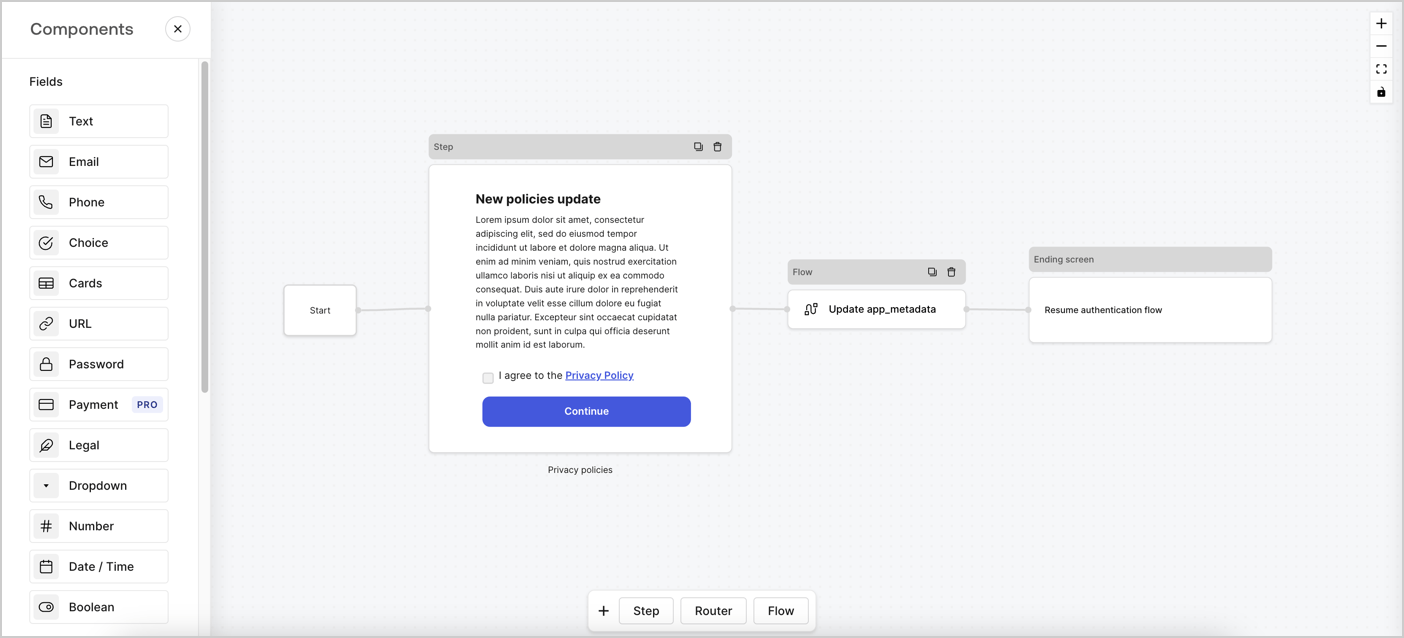
Forms for Actions allows you to create custom privacy policies flows and store the consent under the `app_metadata` object.
<Frame>
  <img src="https://mintcdn.com/docs-dev-feat-acul-js-sdk-1-7-0-docs/3oGMpKyqHph8tSxl/docs/images/cdy7uua7fh8z/6i68dMvHDTijfRmSgN1x8Q/ad900e7d4c0fb34645921435472b8684/privavy-policy-form.png?fit=max&auto=format&n=3oGMpKyqHph8tSxl&q=85&s=1ffee0919623d533c81786b0d29c68d6" alt="Dashboard > Actions > Forms > Privacy policy use case" data-og-width="1404" width="1404" data-og-height="638" height="638" data-path="docs/images/cdy7uua7fh8z/6i68dMvHDTijfRmSgN1x8Q/ad900e7d4c0fb34645921435472b8684/privavy-policy-form.png" data-optimize="true" data-opv="3" srcset="https://mintcdn.com/docs-dev-feat-acul-js-sdk-1-7-0-docs/3oGMpKyqHph8tSxl/docs/images/cdy7uua7fh8z/6i68dMvHDTijfRmSgN1x8Q/ad900e7d4c0fb34645921435472b8684/privavy-policy-form.png?w=280&fit=max&auto=format&n=3oGMpKyqHph8tSxl&q=85&s=ccdb12262fd4aaa1a6d2713d3005bd6d 280w, https://mintcdn.com/docs-dev-feat-acul-js-sdk-1-7-0-docs/3oGMpKyqHph8tSxl/docs/images/cdy7uua7fh8z/6i68dMvHDTijfRmSgN1x8Q/ad900e7d4c0fb34645921435472b8684/privavy-policy-form.png?w=560&fit=max&auto=format&n=3oGMpKyqHph8tSxl&q=85&s=1456b6d1b479c695a68d23c56852b278 560w, https://mintcdn.com/docs-dev-feat-acul-js-sdk-1-7-0-docs/3oGMpKyqHph8tSxl/docs/images/cdy7uua7fh8z/6i68dMvHDTijfRmSgN1x8Q/ad900e7d4c0fb34645921435472b8684/privavy-policy-form.png?w=840&fit=max&auto=format&n=3oGMpKyqHph8tSxl&q=85&s=f1ab8731704532f369e76ec33e03edac 840w, https://mintcdn.com/docs-dev-feat-acul-js-sdk-1-7-0-docs/3oGMpKyqHph8tSxl/docs/images/cdy7uua7fh8z/6i68dMvHDTijfRmSgN1x8Q/ad900e7d4c0fb34645921435472b8684/privavy-policy-form.png?w=1100&fit=max&auto=format&n=3oGMpKyqHph8tSxl&q=85&s=f93df05837d271808db3226e3a6da816 1100w, https://mintcdn.com/docs-dev-feat-acul-js-sdk-1-7-0-docs/3oGMpKyqHph8tSxl/docs/images/cdy7uua7fh8z/6i68dMvHDTijfRmSgN1x8Q/ad900e7d4c0fb34645921435472b8684/privavy-policy-form.png?w=1650&fit=max&auto=format&n=3oGMpKyqHph8tSxl&q=85&s=9b1a595b7dab5324aac1fc88abced9f8 1650w, https://mintcdn.com/docs-dev-feat-acul-js-sdk-1-7-0-docs/3oGMpKyqHph8tSxl/docs/images/cdy7uua7fh8z/6i68dMvHDTijfRmSgN1x8Q/ad900e7d4c0fb34645921435472b8684/privavy-policy-form.png?w=2500&fit=max&auto=format&n=3oGMpKyqHph8tSxl&q=85&s=c977b75b2c16faddad609d35769d9c0b 2500w" />
</Frame>

The sections below outline how you can create an Update Policy form using nodes and flows, along with steps for adding your form to a [Post Login](/docs/customize/actions/explore-triggers/signup-and-login-triggers/login-trigger) Action.

## Create a form from scratch

Follow these steps to create a form to gather information:

1. Open the Form editor by selecting **Auth0 Dashboard > Actions > Forms.**
2. Select **Create Form** > **Start from scratch**.

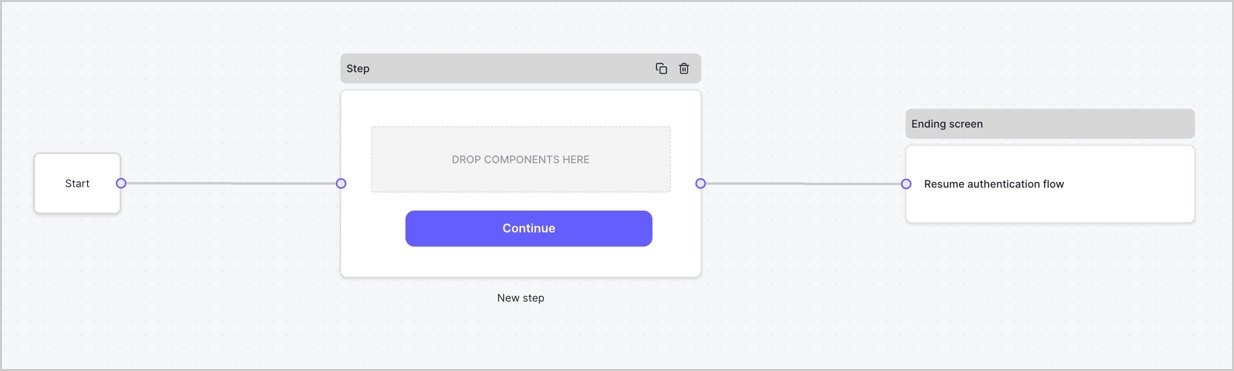
By default, a new form contains a Start node, a Step node, and an Ending screen node.
<Frame>
  <img src="https://mintcdn.com/docs-dev-feat-acul-js-sdk-1-7-0-docs/nZ9_aKfwdq1VQnO5/docs/images/cdy7uua7fh8z/2TZ9jSjgEcARFpULI6hz4R/a4319a1bd482f2ee5cc23100fdb2f42c/New-form-Forms-for-action-use-case.png?fit=max&auto=format&n=nZ9_aKfwdq1VQnO5&q=85&s=996d876f6ec1acddbfc35e68f54c1fa1" alt="Dashboard > Forms > Use Cases > Form" data-og-width="1234" width="1234" data-og-height="371" height="371" data-path="docs/images/cdy7uua7fh8z/2TZ9jSjgEcARFpULI6hz4R/a4319a1bd482f2ee5cc23100fdb2f42c/New-form-Forms-for-action-use-case.png" data-optimize="true" data-opv="3" srcset="https://mintcdn.com/docs-dev-feat-acul-js-sdk-1-7-0-docs/nZ9_aKfwdq1VQnO5/docs/images/cdy7uua7fh8z/2TZ9jSjgEcARFpULI6hz4R/a4319a1bd482f2ee5cc23100fdb2f42c/New-form-Forms-for-action-use-case.png?w=280&fit=max&auto=format&n=nZ9_aKfwdq1VQnO5&q=85&s=4b99c1421b0aababa2f88534b01aaf09 280w, https://mintcdn.com/docs-dev-feat-acul-js-sdk-1-7-0-docs/nZ9_aKfwdq1VQnO5/docs/images/cdy7uua7fh8z/2TZ9jSjgEcARFpULI6hz4R/a4319a1bd482f2ee5cc23100fdb2f42c/New-form-Forms-for-action-use-case.png?w=560&fit=max&auto=format&n=nZ9_aKfwdq1VQnO5&q=85&s=6a2b39120349d443cba4de27c0de1d50 560w, https://mintcdn.com/docs-dev-feat-acul-js-sdk-1-7-0-docs/nZ9_aKfwdq1VQnO5/docs/images/cdy7uua7fh8z/2TZ9jSjgEcARFpULI6hz4R/a4319a1bd482f2ee5cc23100fdb2f42c/New-form-Forms-for-action-use-case.png?w=840&fit=max&auto=format&n=nZ9_aKfwdq1VQnO5&q=85&s=c5a57ee5fb3a14b6784dcb1d50f8c363 840w, https://mintcdn.com/docs-dev-feat-acul-js-sdk-1-7-0-docs/nZ9_aKfwdq1VQnO5/docs/images/cdy7uua7fh8z/2TZ9jSjgEcARFpULI6hz4R/a4319a1bd482f2ee5cc23100fdb2f42c/New-form-Forms-for-action-use-case.png?w=1100&fit=max&auto=format&n=nZ9_aKfwdq1VQnO5&q=85&s=53b436429b8f0b69fde2d5e30ac25d31 1100w, https://mintcdn.com/docs-dev-feat-acul-js-sdk-1-7-0-docs/nZ9_aKfwdq1VQnO5/docs/images/cdy7uua7fh8z/2TZ9jSjgEcARFpULI6hz4R/a4319a1bd482f2ee5cc23100fdb2f42c/New-form-Forms-for-action-use-case.png?w=1650&fit=max&auto=format&n=nZ9_aKfwdq1VQnO5&q=85&s=939eff69f26fe5bf84c246dba082fe8b 1650w, https://mintcdn.com/docs-dev-feat-acul-js-sdk-1-7-0-docs/nZ9_aKfwdq1VQnO5/docs/images/cdy7uua7fh8z/2TZ9jSjgEcARFpULI6hz4R/a4319a1bd482f2ee5cc23100fdb2f42c/New-form-Forms-for-action-use-case.png?w=2500&fit=max&auto=format&n=nZ9_aKfwdq1VQnO5&q=85&s=462a92b4d031499c36c97206736592b8 2500w" />
</Frame>

### Configure the Step node

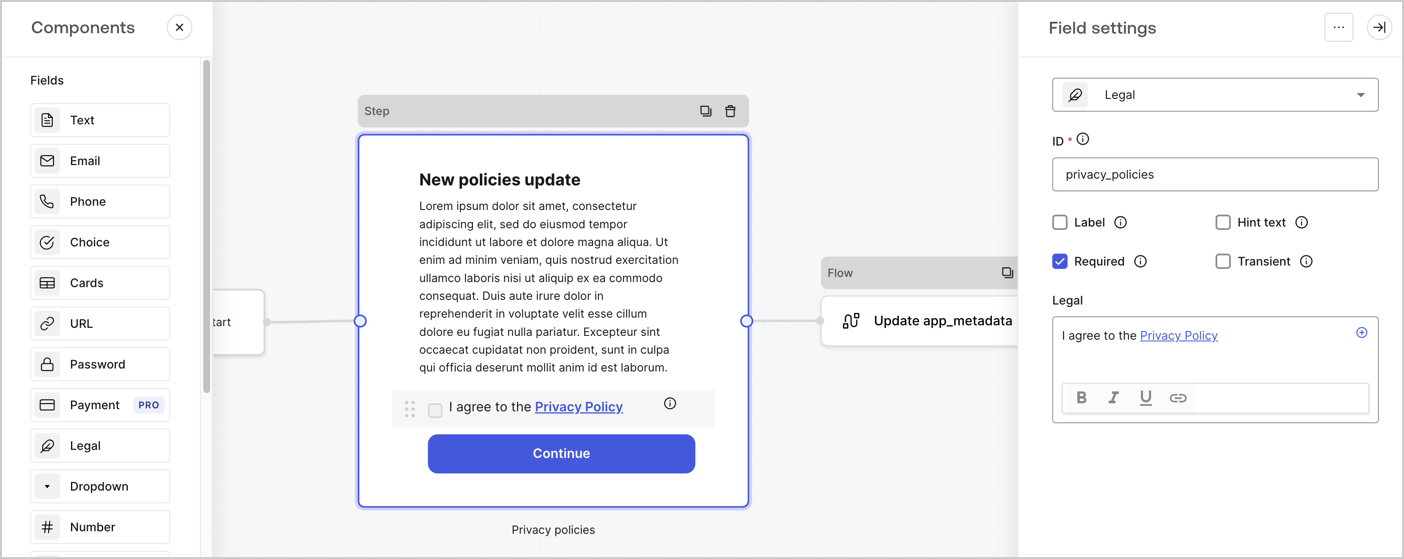
The Step node is the graphical interface visible to users. Add [Fields](/docs/customize/forms/nodes-and-components) to the Step node to collect the new agreement acceptance value by following these steps:

1. Drag a **Rich text** field from the **Components menu** into the **Step** node.

   * **Rich text**: Enter a description of your privacy policies updates.
   * Select **Save**.
2. Drag a **Legal** field into the **Step** node.

   * **ID**: Enter `privacy_policies`.
   * **Required**: Enable the checkbox.
   * **Legal**: Enter `I agree to the Privacy Policy`.
   * Select **Save**.
3. Select **Publish** to save.
<Frame>
  <img src="https://mintcdn.com/docs-dev-feat-acul-js-sdk-1-7-0-docs/GNn8zxRPyEoxwSuT/docs/images/cdy7uua7fh8z/59zFFjQjAnjogkc2QGIqqJ/0ad66b1b636544122aa4e65968b76c2c/privacy-policy-step-node.png?fit=max&auto=format&n=GNn8zxRPyEoxwSuT&q=85&s=c8db56207c0309afd579dd4ff9565cb1" alt="Dashboard > Actions > Forms > Use case privacy policy step node" data-og-width="1404" width="1404" data-og-height="559" height="559" data-path="docs/images/cdy7uua7fh8z/59zFFjQjAnjogkc2QGIqqJ/0ad66b1b636544122aa4e65968b76c2c/privacy-policy-step-node.png" data-optimize="true" data-opv="3" srcset="https://mintcdn.com/docs-dev-feat-acul-js-sdk-1-7-0-docs/GNn8zxRPyEoxwSuT/docs/images/cdy7uua7fh8z/59zFFjQjAnjogkc2QGIqqJ/0ad66b1b636544122aa4e65968b76c2c/privacy-policy-step-node.png?w=280&fit=max&auto=format&n=GNn8zxRPyEoxwSuT&q=85&s=599def7d4aa4982272d7ad1486a6ef0b 280w, https://mintcdn.com/docs-dev-feat-acul-js-sdk-1-7-0-docs/GNn8zxRPyEoxwSuT/docs/images/cdy7uua7fh8z/59zFFjQjAnjogkc2QGIqqJ/0ad66b1b636544122aa4e65968b76c2c/privacy-policy-step-node.png?w=560&fit=max&auto=format&n=GNn8zxRPyEoxwSuT&q=85&s=69baaae09dc365b9cfb25f0362e5dba6 560w, https://mintcdn.com/docs-dev-feat-acul-js-sdk-1-7-0-docs/GNn8zxRPyEoxwSuT/docs/images/cdy7uua7fh8z/59zFFjQjAnjogkc2QGIqqJ/0ad66b1b636544122aa4e65968b76c2c/privacy-policy-step-node.png?w=840&fit=max&auto=format&n=GNn8zxRPyEoxwSuT&q=85&s=df6e24686004efae3d10fda3b617635b 840w, https://mintcdn.com/docs-dev-feat-acul-js-sdk-1-7-0-docs/GNn8zxRPyEoxwSuT/docs/images/cdy7uua7fh8z/59zFFjQjAnjogkc2QGIqqJ/0ad66b1b636544122aa4e65968b76c2c/privacy-policy-step-node.png?w=1100&fit=max&auto=format&n=GNn8zxRPyEoxwSuT&q=85&s=d27bf9712803e423d0d43b93a72c77ce 1100w, https://mintcdn.com/docs-dev-feat-acul-js-sdk-1-7-0-docs/GNn8zxRPyEoxwSuT/docs/images/cdy7uua7fh8z/59zFFjQjAnjogkc2QGIqqJ/0ad66b1b636544122aa4e65968b76c2c/privacy-policy-step-node.png?w=1650&fit=max&auto=format&n=GNn8zxRPyEoxwSuT&q=85&s=dbfdfd1b7cdbe8c9aafa4aa1f3e4d311 1650w, https://mintcdn.com/docs-dev-feat-acul-js-sdk-1-7-0-docs/GNn8zxRPyEoxwSuT/docs/images/cdy7uua7fh8z/59zFFjQjAnjogkc2QGIqqJ/0ad66b1b636544122aa4e65968b76c2c/privacy-policy-step-node.png?w=2500&fit=max&auto=format&n=GNn8zxRPyEoxwSuT&q=85&s=78e1d4b69365e228a4460781b7efe47c 2500w" />
</Frame>

### Configure the Flow node

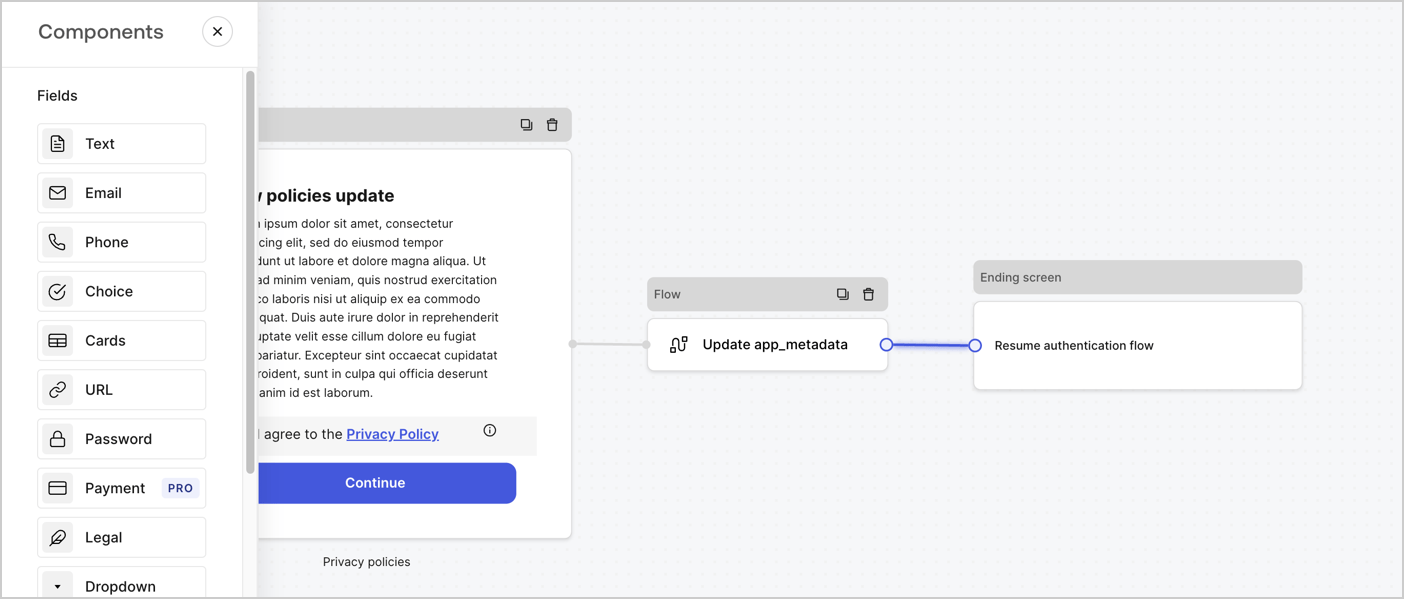
Add a **Flow** node after the **Step** node to update the `app_metadata` and resume the authentication flow by following these steps:

1. Select **Flow** from the bottom of the Form editor.
2. Remove the existing link between the **Step** and **Ending Screen** nodes.
3. Select the new **Flow** > **Click to add a flow** > **Create a new flow.**

   * Enter `Update app_metadata` in the **Name** field.
   * Select **Create**.
   * Select **Save**.
4. Link the **Flow** node to the **Step** and **Ending Screen** nodes as pictured below.
5. Select **Publish** to save.
<Frame>
  <img src="https://mintcdn.com/docs-dev-feat-acul-js-sdk-1-7-0-docs/3oGMpKyqHph8tSxl/docs/images/cdy7uua7fh8z/6YIkzm7SrpM9LW76AXuRzh/353c518fe82bbaa440836da1d83596d6/link-policies.png?fit=max&auto=format&n=3oGMpKyqHph8tSxl&q=85&s=9dc31b3e8c4676d2822fe358e7c1d4b8" alt="Dashboard > Actions > Forms > Form" data-og-width="1404" width="1404" data-og-height="599" height="599" data-path="docs/images/cdy7uua7fh8z/6YIkzm7SrpM9LW76AXuRzh/353c518fe82bbaa440836da1d83596d6/link-policies.png" data-optimize="true" data-opv="3" srcset="https://mintcdn.com/docs-dev-feat-acul-js-sdk-1-7-0-docs/3oGMpKyqHph8tSxl/docs/images/cdy7uua7fh8z/6YIkzm7SrpM9LW76AXuRzh/353c518fe82bbaa440836da1d83596d6/link-policies.png?w=280&fit=max&auto=format&n=3oGMpKyqHph8tSxl&q=85&s=caa9fabf2882d9b2db600254a0a112a3 280w, https://mintcdn.com/docs-dev-feat-acul-js-sdk-1-7-0-docs/3oGMpKyqHph8tSxl/docs/images/cdy7uua7fh8z/6YIkzm7SrpM9LW76AXuRzh/353c518fe82bbaa440836da1d83596d6/link-policies.png?w=560&fit=max&auto=format&n=3oGMpKyqHph8tSxl&q=85&s=73bde83add89a6b6cab8d26e46bcaee3 560w, https://mintcdn.com/docs-dev-feat-acul-js-sdk-1-7-0-docs/3oGMpKyqHph8tSxl/docs/images/cdy7uua7fh8z/6YIkzm7SrpM9LW76AXuRzh/353c518fe82bbaa440836da1d83596d6/link-policies.png?w=840&fit=max&auto=format&n=3oGMpKyqHph8tSxl&q=85&s=526563ad55a18cd09cb849a685bbae9a 840w, https://mintcdn.com/docs-dev-feat-acul-js-sdk-1-7-0-docs/3oGMpKyqHph8tSxl/docs/images/cdy7uua7fh8z/6YIkzm7SrpM9LW76AXuRzh/353c518fe82bbaa440836da1d83596d6/link-policies.png?w=1100&fit=max&auto=format&n=3oGMpKyqHph8tSxl&q=85&s=c70d289312767b06b5ea9c99653eaa1f 1100w, https://mintcdn.com/docs-dev-feat-acul-js-sdk-1-7-0-docs/3oGMpKyqHph8tSxl/docs/images/cdy7uua7fh8z/6YIkzm7SrpM9LW76AXuRzh/353c518fe82bbaa440836da1d83596d6/link-policies.png?w=1650&fit=max&auto=format&n=3oGMpKyqHph8tSxl&q=85&s=a49049ebf8dba4f7088c09eaa2bd959d 1650w, https://mintcdn.com/docs-dev-feat-acul-js-sdk-1-7-0-docs/3oGMpKyqHph8tSxl/docs/images/cdy7uua7fh8z/6YIkzm7SrpM9LW76AXuRzh/353c518fe82bbaa440836da1d83596d6/link-policies.png?w=2500&fit=max&auto=format&n=3oGMpKyqHph8tSxl&q=85&s=2800549fdf34d7c8ae8d4dca1c530199 2500w" />
</Frame>

Add an Auth0 Update user action to the flow by following these steps:

1. Select the **Flow** **Update app\_metadata** > **Edit flow** to open the Flow editor in a new tab.
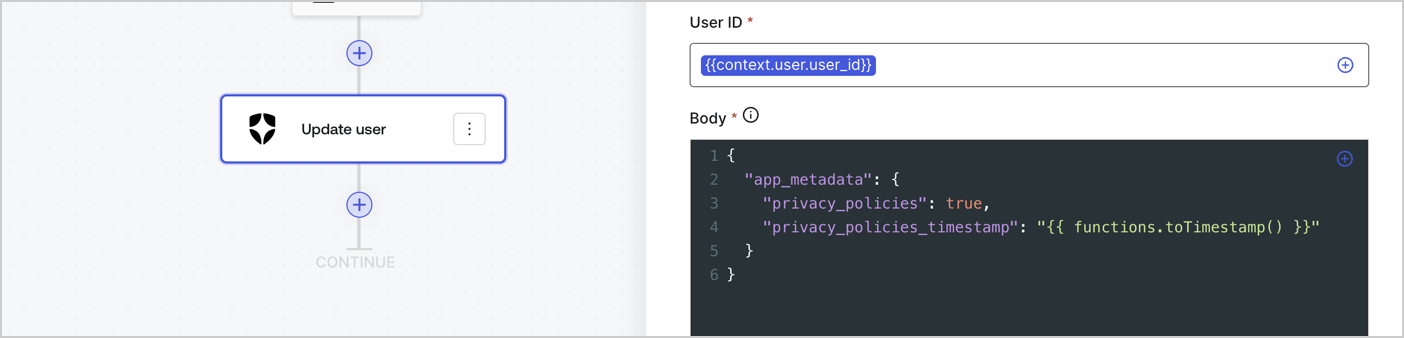
2. Below the StartAction, select the **+** icon to add an **Update user** action. Complete the fields below, then select **Save** to continue.

   * **Connection**: Select from the dropdown the Vault connection to your M2M application.

   * **User ID**: Enter `{{context.user.user_id}}`.

   * **Body**: Copy and paste the following code to update the app\_metadata with the privacy\_policies and privacy\_policies\_timestamp properties.

     ```text lines theme={null}
     {
       "app_metadata": {
         "privacy_policies": true,
         "privacy_policies_timestamp": "{{ functions.toTimestamp() }}"
       }
     }
     ```

   * Select **Save**.
3. Select **Publish** to save.
<Frame>
  <img src="https://mintcdn.com/docs-dev-feat-acul-js-sdk-1-7-0-docs/50BteaCNwErjIvLA/docs/images/cdy7uua7fh8z/CvMNIwWrOUwaFW4X3G28p/1fb70ae57a20749d9ffaaba8dc0b7e26/update-user-privacy.png?fit=max&auto=format&n=50BteaCNwErjIvLA&q=85&s=0b05106aefd20c44359c062cd2cd689d" alt="Dashboard > Actions > Forms > User case privacy policy code" data-og-width="1404" width="1404" data-og-height="338" height="338" data-path="docs/images/cdy7uua7fh8z/CvMNIwWrOUwaFW4X3G28p/1fb70ae57a20749d9ffaaba8dc0b7e26/update-user-privacy.png" data-optimize="true" data-opv="3" srcset="https://mintcdn.com/docs-dev-feat-acul-js-sdk-1-7-0-docs/50BteaCNwErjIvLA/docs/images/cdy7uua7fh8z/CvMNIwWrOUwaFW4X3G28p/1fb70ae57a20749d9ffaaba8dc0b7e26/update-user-privacy.png?w=280&fit=max&auto=format&n=50BteaCNwErjIvLA&q=85&s=8568f807833b4b5c8a2b563db3eb5a99 280w, https://mintcdn.com/docs-dev-feat-acul-js-sdk-1-7-0-docs/50BteaCNwErjIvLA/docs/images/cdy7uua7fh8z/CvMNIwWrOUwaFW4X3G28p/1fb70ae57a20749d9ffaaba8dc0b7e26/update-user-privacy.png?w=560&fit=max&auto=format&n=50BteaCNwErjIvLA&q=85&s=ca2c2cbede7568c417546eb62e1c8d36 560w, https://mintcdn.com/docs-dev-feat-acul-js-sdk-1-7-0-docs/50BteaCNwErjIvLA/docs/images/cdy7uua7fh8z/CvMNIwWrOUwaFW4X3G28p/1fb70ae57a20749d9ffaaba8dc0b7e26/update-user-privacy.png?w=840&fit=max&auto=format&n=50BteaCNwErjIvLA&q=85&s=dda1c3043a5d19c27d84c7dbbc299276 840w, https://mintcdn.com/docs-dev-feat-acul-js-sdk-1-7-0-docs/50BteaCNwErjIvLA/docs/images/cdy7uua7fh8z/CvMNIwWrOUwaFW4X3G28p/1fb70ae57a20749d9ffaaba8dc0b7e26/update-user-privacy.png?w=1100&fit=max&auto=format&n=50BteaCNwErjIvLA&q=85&s=3a81bf799f075adc840129e80e1047d8 1100w, https://mintcdn.com/docs-dev-feat-acul-js-sdk-1-7-0-docs/50BteaCNwErjIvLA/docs/images/cdy7uua7fh8z/CvMNIwWrOUwaFW4X3G28p/1fb70ae57a20749d9ffaaba8dc0b7e26/update-user-privacy.png?w=1650&fit=max&auto=format&n=50BteaCNwErjIvLA&q=85&s=fe5e8ef78add9f8b4178f9d245c283c1 1650w, https://mintcdn.com/docs-dev-feat-acul-js-sdk-1-7-0-docs/50BteaCNwErjIvLA/docs/images/cdy7uua7fh8z/CvMNIwWrOUwaFW4X3G28p/1fb70ae57a20749d9ffaaba8dc0b7e26/update-user-privacy.png?w=2500&fit=max&auto=format&n=50BteaCNwErjIvLA&q=85&s=03217b768f17ab0a80743ae0cde5cb8c 2500w" />
</Frame>

<Callout icon="file-lines" color="#0EA5E9" iconType="regular">
  The flow **Update app\_metadata** adds a `privacy_policies true` value to the app`_metadata` object and also generates a timestamp with a [helper function.](/docs/customize/forms/variables)
</Callout>

## Retrieve the form render code

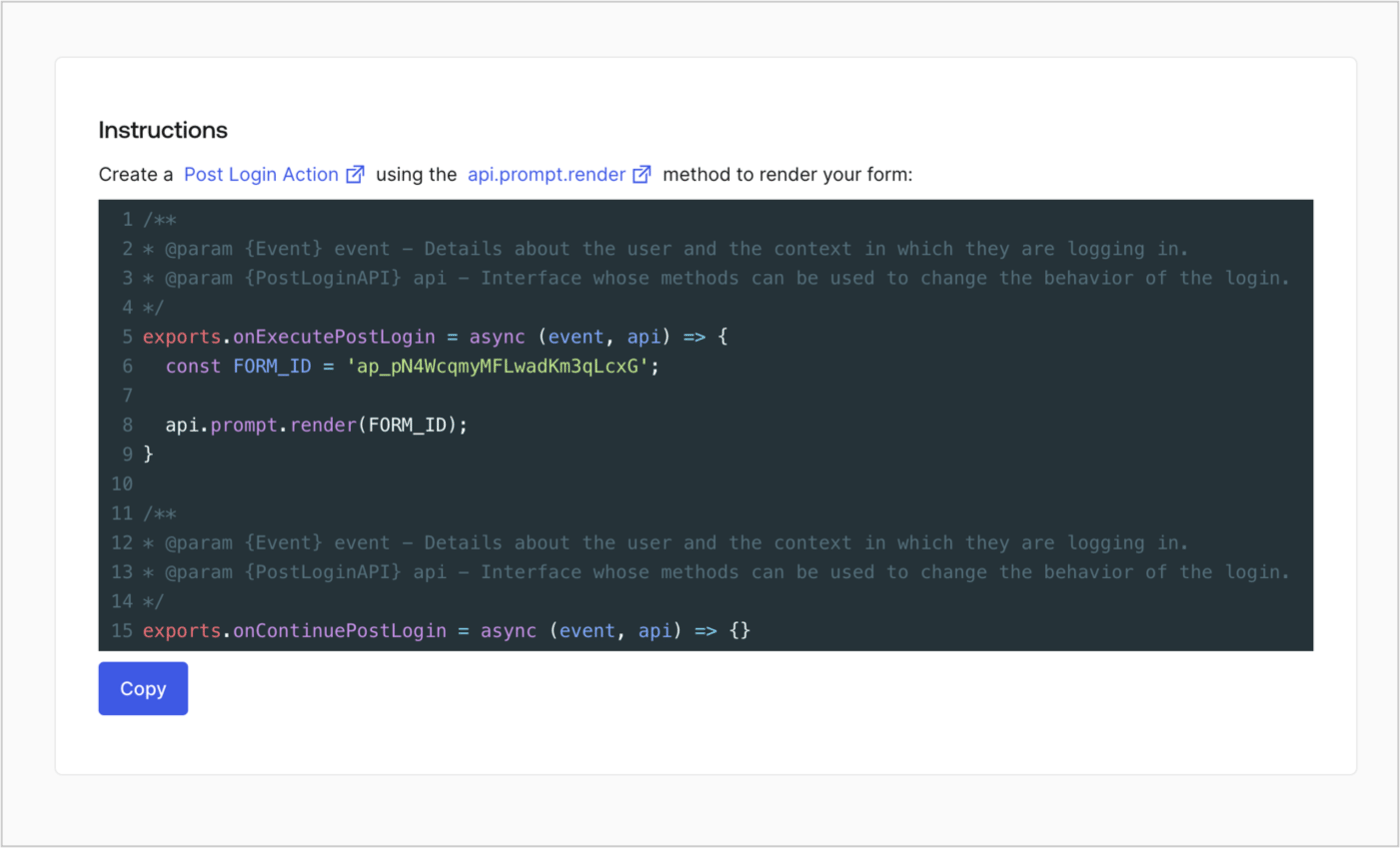
Retrieve your form render code to visually render the form with a custom Post Login Action by following these steps:

* From the Form editor, select **`<> Render`**.
* Select **Copy**.
<Frame>
  <img src="https://mintcdn.com/docs-dev-feat-acul-js-sdk-1-7-0-docs/oljSqUkY2AUuVAWT/docs/images/cdy7uua7fh8z/2EIUzc539sq9lwoTKbjoJv/496a864c0fc44a782c9cadca119dbfb0/embed.png?fit=max&auto=format&n=oljSqUkY2AUuVAWT&q=85&s=60be72fa59d6623447ac77eda9e69d79" alt="Dashboard > Actions > Forms > Form > Embed" data-og-width="1400" width="1400" data-og-height="848" height="848" data-path="docs/images/cdy7uua7fh8z/2EIUzc539sq9lwoTKbjoJv/496a864c0fc44a782c9cadca119dbfb0/embed.png" data-optimize="true" data-opv="3" srcset="https://mintcdn.com/docs-dev-feat-acul-js-sdk-1-7-0-docs/oljSqUkY2AUuVAWT/docs/images/cdy7uua7fh8z/2EIUzc539sq9lwoTKbjoJv/496a864c0fc44a782c9cadca119dbfb0/embed.png?w=280&fit=max&auto=format&n=oljSqUkY2AUuVAWT&q=85&s=5647133f830573eeb84529508f1b3b6c 280w, https://mintcdn.com/docs-dev-feat-acul-js-sdk-1-7-0-docs/oljSqUkY2AUuVAWT/docs/images/cdy7uua7fh8z/2EIUzc539sq9lwoTKbjoJv/496a864c0fc44a782c9cadca119dbfb0/embed.png?w=560&fit=max&auto=format&n=oljSqUkY2AUuVAWT&q=85&s=a300b1bd30283a5f64433167f9f60570 560w, https://mintcdn.com/docs-dev-feat-acul-js-sdk-1-7-0-docs/oljSqUkY2AUuVAWT/docs/images/cdy7uua7fh8z/2EIUzc539sq9lwoTKbjoJv/496a864c0fc44a782c9cadca119dbfb0/embed.png?w=840&fit=max&auto=format&n=oljSqUkY2AUuVAWT&q=85&s=a4ba603581ee0662cf025742217941f7 840w, https://mintcdn.com/docs-dev-feat-acul-js-sdk-1-7-0-docs/oljSqUkY2AUuVAWT/docs/images/cdy7uua7fh8z/2EIUzc539sq9lwoTKbjoJv/496a864c0fc44a782c9cadca119dbfb0/embed.png?w=1100&fit=max&auto=format&n=oljSqUkY2AUuVAWT&q=85&s=38f77a28f396297e2e2b7439ad64117a 1100w, https://mintcdn.com/docs-dev-feat-acul-js-sdk-1-7-0-docs/oljSqUkY2AUuVAWT/docs/images/cdy7uua7fh8z/2EIUzc539sq9lwoTKbjoJv/496a864c0fc44a782c9cadca119dbfb0/embed.png?w=1650&fit=max&auto=format&n=oljSqUkY2AUuVAWT&q=85&s=e304f9b6aea191d1e6835e9c396ea643 1650w, https://mintcdn.com/docs-dev-feat-acul-js-sdk-1-7-0-docs/oljSqUkY2AUuVAWT/docs/images/cdy7uua7fh8z/2EIUzc539sq9lwoTKbjoJv/496a864c0fc44a782c9cadca119dbfb0/embed.png?w=2500&fit=max&auto=format&n=oljSqUkY2AUuVAWT&q=85&s=18f33cffb927d7f7c5a2ccfea3c34488 2500w" />
</Frame>

## Create a Post Login Action

Create a post-login Action to render your form by following these steps:

1. Navigate to **Auth0 Dashboard > Actions > Flows > Login.**
2. Select the **+** icon and Select **Build from scratch**:

   * **Name**: Enter `Render Update Policy Form`.
   * **Trigger**: Select `Login / Post Login`.
   * **Runtime**: Select the recommended version.
3. Select **Create**.

To configure the post-login Action:

1. Delete the existing code from the Code editor.
2. Paste the form render code into the Code editor.
3. Edit the code to define the conditional logic that will render the form.

   ```javascript lines theme={null}
   /**
   * @param {Event} event - Details about the user and the context in which they are logging in.
   * @param {PostLoginAPI} api - Interface whose methods can be used to change the behavior of the login.
   */
   exports.onExecutePostLogin = async (event, api) => {
     const FORM_ID = 'REPLACE_WITH_YOUR_FORM_ID';

     if (event.user.app_metadata.privacy_policies !== true) {
       api.prompt.render(FORM_ID);
     }
   }

   exports.onContinuePostLogin = async (event, api) => { }
   ```

   <Callout icon="file-lines" color="#0EA5E9" iconType="regular">
     The example code above will render the form when a user is missing the app metadata `privacy_policies` property.
   </Callout>
4. Select **Deploy.**
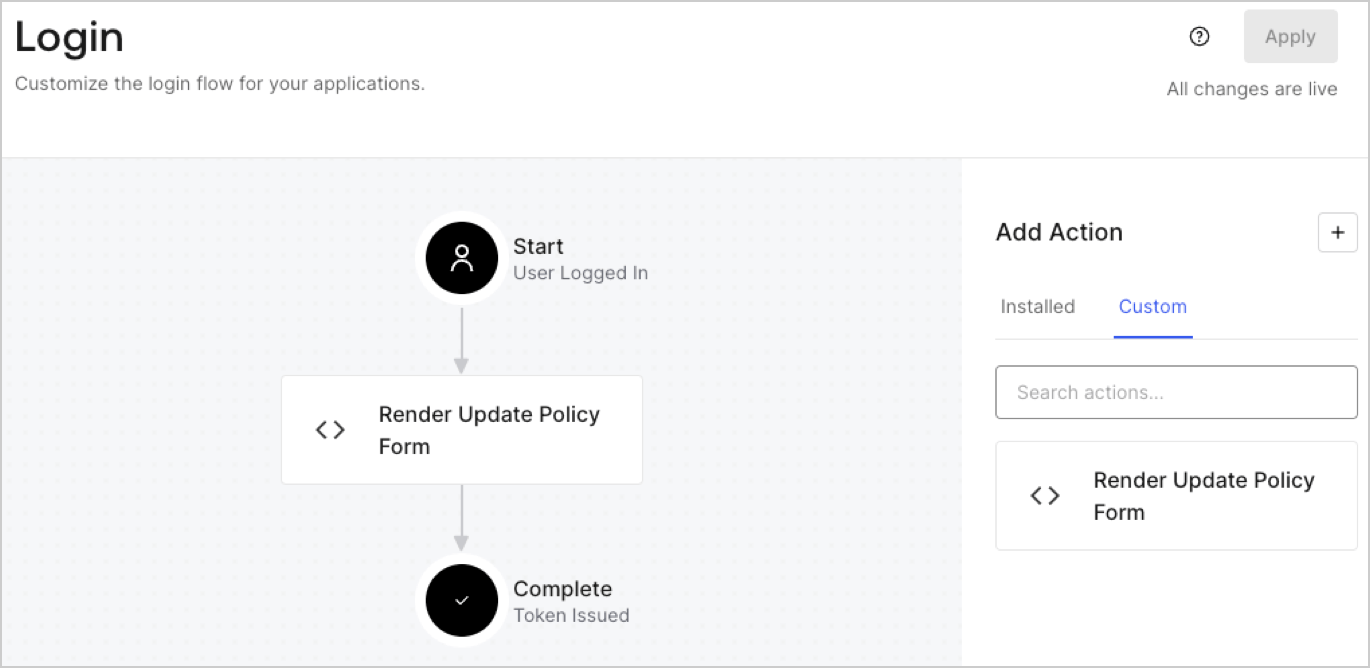
5. Drag and Drop the **Render Update Policy Form** Action to the **Login** flow.
   <Frame>
     <img src="https://mintcdn.com/docs-dev-feat-acul-js-sdk-1-7-0-docs/utkcvCUOOuylL2KP/docs/images/cdy7uua7fh8z/5TOwDgevZsBqd7yZynUYWU/41ca909dc3007aed4f40ff794a05efa5/postlogin.png?fit=max&auto=format&n=utkcvCUOOuylL2KP&q=85&s=38b869a6b9e785910cc22ccdc26417a7" alt="Dashboard > Forms > Use Case > Render update policy form login action" data-og-width="1370" width="1370" data-og-height="668" height="668" data-path="docs/images/cdy7uua7fh8z/5TOwDgevZsBqd7yZynUYWU/41ca909dc3007aed4f40ff794a05efa5/postlogin.png" data-optimize="true" data-opv="3" srcset="https://mintcdn.com/docs-dev-feat-acul-js-sdk-1-7-0-docs/utkcvCUOOuylL2KP/docs/images/cdy7uua7fh8z/5TOwDgevZsBqd7yZynUYWU/41ca909dc3007aed4f40ff794a05efa5/postlogin.png?w=280&fit=max&auto=format&n=utkcvCUOOuylL2KP&q=85&s=4ab5d4e07ef40bb5b2060297f95e1ab6 280w, https://mintcdn.com/docs-dev-feat-acul-js-sdk-1-7-0-docs/utkcvCUOOuylL2KP/docs/images/cdy7uua7fh8z/5TOwDgevZsBqd7yZynUYWU/41ca909dc3007aed4f40ff794a05efa5/postlogin.png?w=560&fit=max&auto=format&n=utkcvCUOOuylL2KP&q=85&s=2a1937a78b294462f5d68dc5a2bd587d 560w, https://mintcdn.com/docs-dev-feat-acul-js-sdk-1-7-0-docs/utkcvCUOOuylL2KP/docs/images/cdy7uua7fh8z/5TOwDgevZsBqd7yZynUYWU/41ca909dc3007aed4f40ff794a05efa5/postlogin.png?w=840&fit=max&auto=format&n=utkcvCUOOuylL2KP&q=85&s=4437949a6df884c000221680964d8130 840w, https://mintcdn.com/docs-dev-feat-acul-js-sdk-1-7-0-docs/utkcvCUOOuylL2KP/docs/images/cdy7uua7fh8z/5TOwDgevZsBqd7yZynUYWU/41ca909dc3007aed4f40ff794a05efa5/postlogin.png?w=1100&fit=max&auto=format&n=utkcvCUOOuylL2KP&q=85&s=5a655ee416e56bf30dd26372c045ed0d 1100w, https://mintcdn.com/docs-dev-feat-acul-js-sdk-1-7-0-docs/utkcvCUOOuylL2KP/docs/images/cdy7uua7fh8z/5TOwDgevZsBqd7yZynUYWU/41ca909dc3007aed4f40ff794a05efa5/postlogin.png?w=1650&fit=max&auto=format&n=utkcvCUOOuylL2KP&q=85&s=666ebf2c89d281e151f400f267c2d798 1650w, https://mintcdn.com/docs-dev-feat-acul-js-sdk-1-7-0-docs/utkcvCUOOuylL2KP/docs/images/cdy7uua7fh8z/5TOwDgevZsBqd7yZynUYWU/41ca909dc3007aed4f40ff794a05efa5/postlogin.png?w=2500&fit=max&auto=format&n=utkcvCUOOuylL2KP&q=85&s=8fc893742c34451ba44a54749df2b025 2500w" />
   </Frame>
6. Select **Apply.**

### Test implementation

Test the implementation by following these steps:

1. Log in with an existing user whose app`_metadata` attribute `privacy_policies` does not have a value.
2. The post-login Action in the Login flow will render the form and prompt for acceptance.
3. Select **Auth0 Dashboard > User Management > Users,** locate the user and verify that the `app_metadata` attribute `privacy_policies` contains a `true` value and a timestamp.
